Plotting API
Graphical displays are a powerful tool for providing informative visual summaries of the result of a given Bayesian inference procedure for a univariate density. BayesDensity makes it easy to plot posterior summaries for $f$ using the results from Markov chain Monte Carlo sampling or variational inference through its extensions for the Makie.jl and Plots.jl packages.
In addition to documenting the plotting-related public API, this page also showcases the plotting capabilities of the BayesDensityCore package through examples. Although we will not delve deep into implementational details here, some familiarity with Makie.jl or Plots.jl is an advantage when reading this part of the documentation.
The following sections are structured so that the Makie- and the Plots-portions of the tutorial can be read independently of one another. As such, there is no need for a Makie power-user to read the Plots sections of this page.
Plotting with Makie.jl
Visualizing posterior estimates
In general, the available plot method for PosteriorSamples and AbstractVIPosterior objects has the following signature:
plot(
    ps::Union{PosteriorSamples, AbstractVIPosterior},
    [func = pdf],
    [t::AbstractVector{<:Real}];
    ci::Bool = true,
    level::Real = 0.95,
    estimate = mean,
    alpha::Real = 0.25,
    kwargs...
)
The first argument to plot is the posterior distribution, fitted via either Markov chain Monte Carlo or variational inference. The second (optional) positional argument indicates whether to plot estimates of the pdf or the cdf. By default, the estimated pdf is shown. The third (optional) positional argument is the grid at which the pdf or cdf is evaluated to draw the grid. The ci keyword is a boolean, controlling whether or not a credible interval should be drawn (enabled by default). To control the level of the drawn credible interval, set the level keyword argument to the desired confidence level.
Other keyword arguments mostly control the appearance of the drawn lines and credible bands. Of particular note are strokecolor, which controls the color of the density estimate, and color, which controls the color of the credible bands. The alpha keyword argument controls the transparency of the credible bands. The line width of the density estimate is controlled through the :strokewidth keyword argument.
MCMC model diagnostics
Makie can also be used to create a diagnostic plot for the MCMC output:
BayesDensityCore.Makie.check_chains — Function
BayesDensityCore.Makie.check_chains(
    ps::PosteriorSamples...;
    [grid::Union{Real, AbstractVector{<:Real}}],
    include_burnin::Bool = true,
    lags::AbstractUnitRange{<:Integer} = 1:40
)
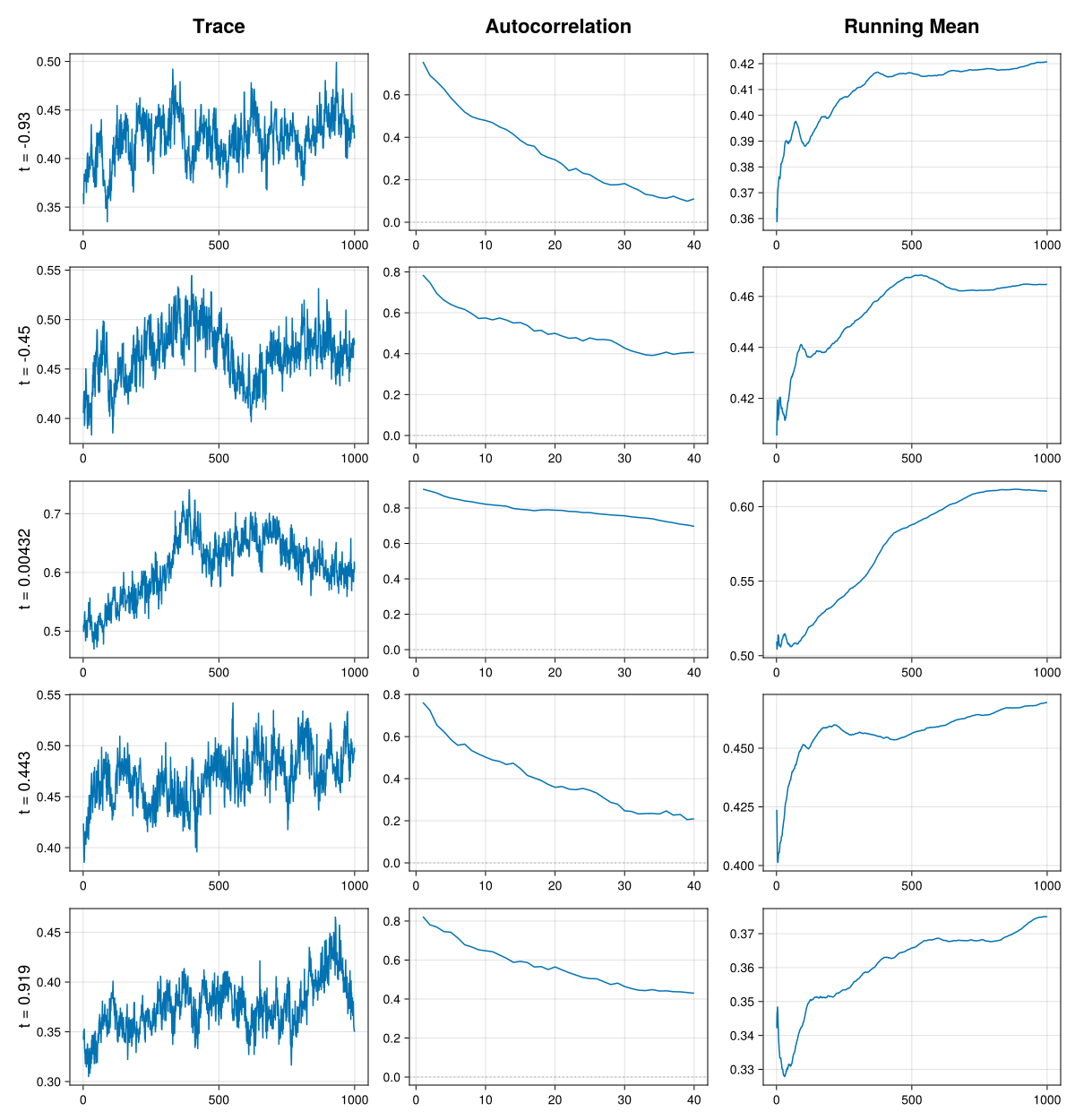
Generate traceplots, autocorrelation plots and a running mean plot for the posterior samples of the density $f$, evaluated at each point in grid. When called with multiple PosteriorSamples objects, one line per object is added to each plot, allowing visual comparison of chains across multiple runs.
Arguments
ps: ABayesDensityCore.PosteriorSamplesobject.
Keyword arguments
grid: The grid of values for which the posterior density is evaluated. Defaults to 5 evenly spaced points lying between the end points ofBayesDensityCore.default_grid_pointsinclude_burnin: A boolean indicating whether or not the burn-in samples should be dropped in the trace- and running mean plots. Defaults totrue.lags: The lags at which the autocorrelation function should be evaluated. Defaults to1:30.
Examples
julia> using Random

julia> x = (1.0 .- (1.0 .- LinRange(0.0, 1.0, 5000)) .^(1/3)).^(1/3);

julia> hs = HistSmoother(x);

julia> ps = sample(Xoshiro(1), hs, 1100);

julia> check_chains(ps, [0.2, 0.5, 0.8]);The above function is not exported by its parent module BayesDensityCore, but it is exported by BayesDensityCore.Makie. This method requires Makie to be loaded, and can be accessed as BayesDensityCore.Makie.check_chains.
Example
To show the plotting-capabilities of the Makie extension in practice, we start by importing the required packages and fit a BayesDensity model to some simulated data:
using BayesDensityHistSmoother, CairoMakie, Distributions, Random
rng = Random.Xoshiro(1)

# Simulate some data from the "Claw" density
d_true = MixtureModel(
    vcat(Normal(0, 1), [Normal(0.5*j, 0.1) for j in -2:2]),
    [0.5, 0.1, 0.1, 0.1, 0.1, 0.1]
)
x = rand(rng, d_true, 5000)

# Fit the model via MCMC and VI
histsmoother = HistSmoother(x)
posterior_sample = sample(rng, histsmoother, 1100)
vi_posterior, info = varinf(histsmoother)
Having fitted the model, we can use the extended plot function to generate various plots from the fitted model objects, be it the variational posterior or the MCMC samples. The most basic usage of the plotting function is to simply call plot(posterior_sample) or plot(vi_posterior), which both generate a plot of the estimated posterior mean of $f$, along with 95 % pointwise credible bands. The code snippet below illustrates how one can customize the posterior plots:
t = LinRange(-3.5, 3.5, 4001)

# Create figure, axes
fig = Figure(size=(550, 550))
ax1 = Axis(fig[1,1], xlabel="x", ylabel="Density")
ax2 = Axis(fig[1,2], xlabel="x", ylabel="Density")
ax3 = Axis(fig[2,1], xlabel="x", ylabel="Cumulative density")
ax4 = Axis(fig[2,2], xlabel="x", ylabel="Cumulative density")

# Plot estimated density and CI from MCMC samples
plot!(ax1, posterior_sample, color=:red, strokecolor=:red, label="Estimate (CI)", alpha=0.1)
ylims!(ax1, 0.0, 0.85)

# Compare the posterior median of the VI fit to the true density (without CI)
plot!(ax2, vi_posterior, pdf, t; ci=false,
      estimate=median, label="Estimate") # NB! Supplying pdf is redundant here
lines!(ax2, t, pdf(d_true, t), color=:black, label="True pdf",
       linestyle=:dash)
xlims!(ax2, -2.5, 2.5)
ylims!(ax2, 0.0, 0.85)

# Plot the estimated cdf and the CI
plot!(ax3, posterior_sample, cdf, level=0.99, color=:red, strokecolor=:red, label="Estimate (CI)")

# Compare estimated cdf of the VI fit to the true cdf (without CI)
plot!(ax4, vi_posterior, cdf, ci=false, label="Estimate")
lines!(ax4, t, cdf(d_true, t),
      color = :black, label="True cdf", linestyle=:dash)
xlims!(ax4, -2.2, 2.2)

for ax in (ax1, ax2, ax3, ax4)
    axislegend(ax; position=:lt, framevisible=false, labelsize=10)
end

fig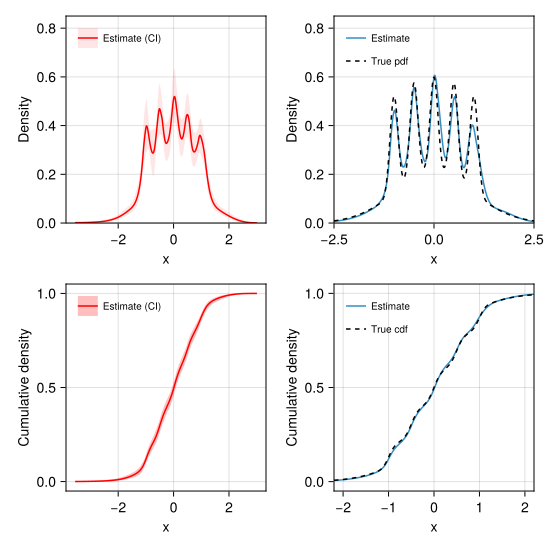
The BayesDensityCore.Makie.check_chains method can be used as follows:
BayesDensityCore.Makie.check_chains(
    posterior_sample;
    grid = quantile(x, [j/6 for j in 1:5])
)
Makie.jl plots can also be used to perform model diagnostics for variational inference by plotting the evolution of the evidence lower bound (ELBO) on a per-iteration basis. This can be achieved by calling plot(info) on a VariationalOptimizationResult. Note that this is effectively just a thin wrapper around lines(elbo(info)).
Plotting with Plots.jl
In general, the available plot method for PosteriorSamples and AbstractVIPosterior objects has the following signature:
plot(
    ps::Union{PosteriorSamples, AbstractVIPosterior},
    [func = pdf],
    [t::AbstractVector{<:Real}];
    ci::Bool = true,
    level::Real = 0.95,
    estimate = mean,
    alpha::Real = 0.25,
    kwargs...
)
The first argument to plot is the posterior distribution, fitted via either Markov chain Monte Carlo or variational inference. The second (optional) positional argument indicates whether to plot estimates of the pdf or the cdf. By default, the estimated pdf is shown. The third (optional) positional argument is the grid at which the pdf or cdf is evaluated to draw the grid. The ci keyword is a boolean, controlling whether or not a credible interval should be drawn (enabled by default). To control the level of the drawn credible interval, set the level keyword argument to the desired confidence level.
Other keyword arguments mostly control the appearance of the drawn lines and credible bands. Of particular note are color, which controls the color of the density estimate, and fillcolor, which controls the color of the credible bands. The fillalpha keyword argument controls the transparency of the credible bands.
MCMC diagnostic plots
Plots can also be used to create a diagnostic plot for the MCMC output:
BayesDensityCore.Plots.check_chains — Function
BayesDensityCore.Plots.check_chains(
    ps::PosteriorSamples...;
    [grid::Union{Real, AbstractVector{<:Real}}],
    include_burnin::Bool = true,
    lags::AbstractUnitRange{<:Integer} = 1:40
)
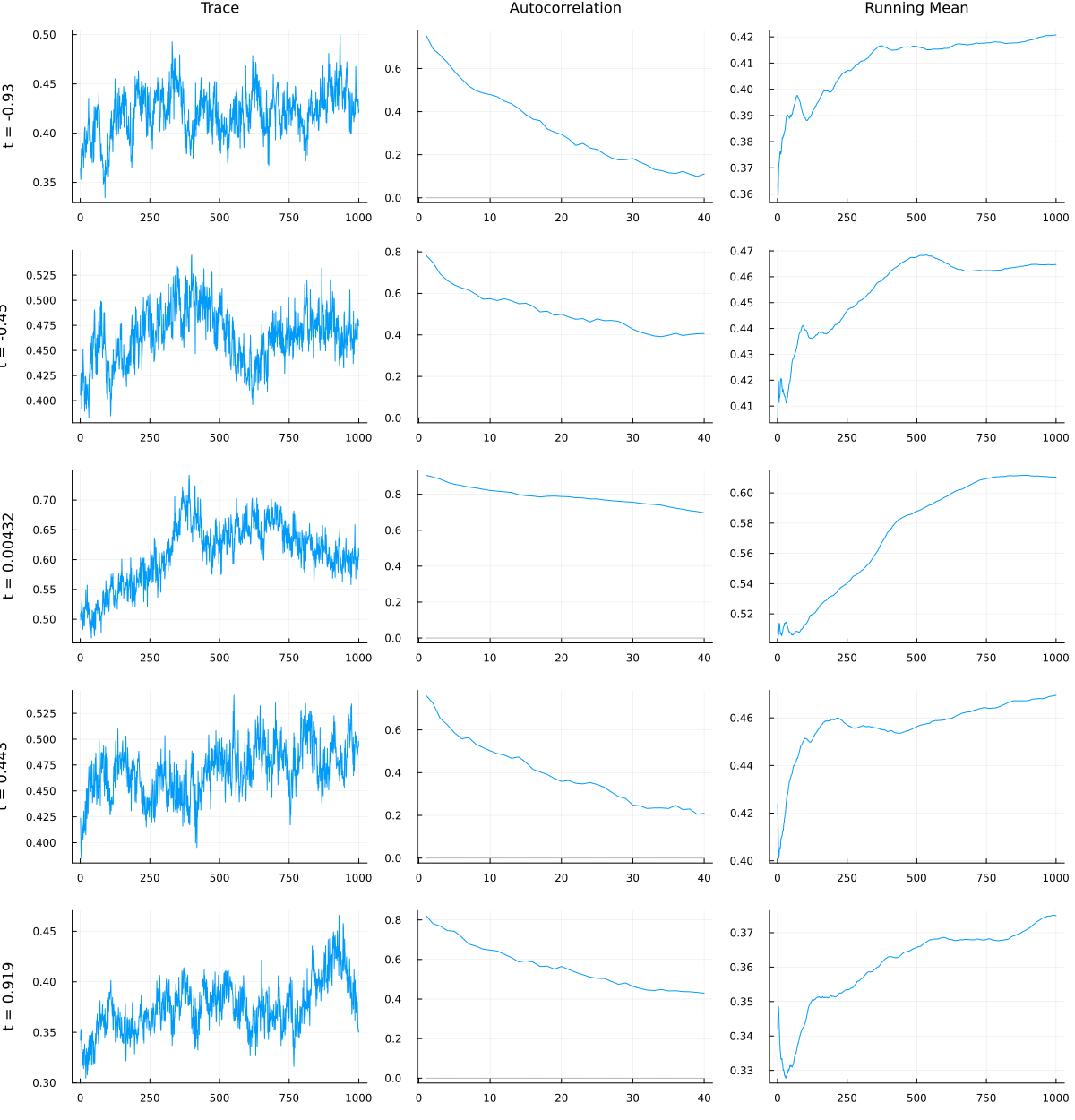
Generate traceplots, autocorrelation plots and a running mean plot for the posterior samples of the density $f$, evaluated at each point in grid. When called with multiple PosteriorSamples objects, one line per object is added to each plot, allowing visual comparison of chains across multiple runs.
Arguments
ps: ABayesDensityCore.PosteriorSamplesobject.
Keyword arguments
grid: The grid of values for which the posterior density is evaluated. Defaults to 5 evenly spaced points lying between the end points ofBayesDensityCore.default_grid_pointsinclude_burnin: A boolean indicating whether or not the burn-in samples should be dropped in the trace- and running mean plots. Defaults totrue.lags: The lags at which the autocorrelation function should be evaluated. Defaults to1:30.
Examples
julia> using Random

julia> x = (1.0 .- (1.0 .- LinRange(0.0, 1.0, 5000)) .^(1/3)).^(1/3);

julia> hs = HistSmoother(x);

julia> ps = sample(Xoshiro(1), hs, 1100);

julia> check_chains(ps, [0.2, 0.5, 0.8]);The above function is not exported by its parent module BayesDensityCore, but it is exported by BayesDensityCore.Plots. This method requires Plots to be loaded, and can be accessed as BayesDensityCore.Plots.check_chains.
Example
To show the plotting-capabilities of the Plots extension in practice, we start by importing the required packages and fit a BayesDensity model to some simulated data:
using BayesDensityHistSmoother, Plots, Distributions, Random
rng = Random.Xoshiro(1)

# Simulate some data from the "Claw" density
d_true = MixtureModel(
    vcat(Normal(0, 1), [Normal(0.5*j, 0.1) for j in -2:2]),
    [0.5, 0.1, 0.1, 0.1, 0.1, 0.1]
)
x = rand(rng, d_true, 1000)

# Fit the model via MCMC and VI
histsmoother = HistSmoother(x)
posterior_sample = sample(rng, histsmoother, 1100)
vi_posterior, info = varinf(histsmoother)
Having fitted the model, we can use the extended plot function to generate various plots from the fitted model objects, be it the variational posterior or the MCMC samples. The most basic usage of the is to simply call plot(posterior_sample) or plot(vi_posterior), which both generate a plot of the estimated posterior mean of $f$, along with 95 % pointwise credible bands. The code snippet below illustrates how one can customize the posterior plots:
t = LinRange(-3.5, 3.5, 4001)

# Create subplots
p1 = plot(xlabel="x", ylabel="Density")
p2 = plot(xlabel="x", ylabel="Density")
p3 = plot(xlabel="x", ylabel="Cumulative density")
p4 = plot(xlabel="x", ylabel="Cumulative density")

# Plot estimated density and CI from MCMC samples
plot!(p1, posterior_sample, color=:red, fillcolor=:red,
      label="Estimate (CI)", fillalpha=0.1)
ylims!(p1, 0.0, 0.7)

# Compare the posterior median of the VI fit to the true density (without CI)
plot!(p2, vi_posterior, pdf, t; ci=false,
      estimate=median, label="Estimate") # NB! Supplying pdf is redundant here
plot!(p2, t, pdf(d_true, t), color=:black, label="True pdf",
       linestyle=:dash)
xlims!(p2, -2.5, 2.5)
ylims!(p2, 0.0, 0.7)

# Plot the estimated cdf and the CI
plot!(p3, posterior_sample, cdf, level=0.99, color=:red, fillcolor=:red, label="Estimate (CI)")

# Compare estimated cdf of the VI fit to the true cdf (without CI)
plot!(p4, vi_posterior, cdf, ci=false, label="Estimate")
plot!(p4, t, cdf(d_true, t),
      color = :black, label="True cdf", linestyle=:dash)
xlims!(p4, -2.2, 2.2)

plot(p1, p2, p3, p4, layout=(2,2), size=(550, 550))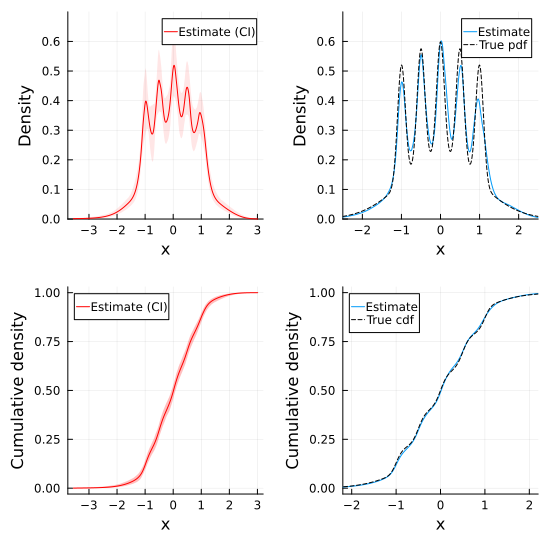
The BayesDensityCore.Plots.check_chains method can be used as follows:
BayesDensityCore.Plots.check_chains(
    posterior_sample;
    grid = quantile(x, [j/6 for j in 1:5])
)
Plots.jl plots can also be used to perform model diagnostics for variational inference by plotting the evolution of the evidence lower bound (ELBO) on a per-iteration basis. This can be achieved by calling plot(info) on a VariationalOptimizationResult. Note that this is effectively just a thin wrapper around plot(elbo(info)).